 Wirefold
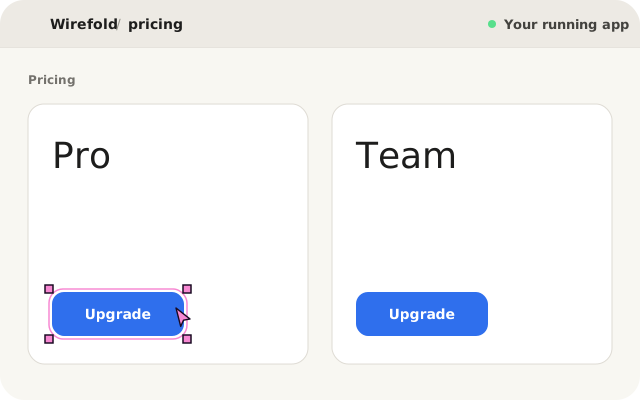
When developers ask an AI coding assistant to change a UI component, the biggest source of failure is rarely code syntax. It is location ambiguity. In modern React and Next.js applications, finding the exact file, component definition, and call site behind a button or layout card is a deceptively difficult engineering problem.
Conventional coding tools ask a Large Language Model to guess which file to edit by reading filenames, crawling directory trees, or running fuzzy text searches across the repository. In non-trivial codebases with compound components, higher-order wrappers, polymorphic elements, and shared design system primitives, model guessing breaks down rapidly.
Instead of forcing models to guess file locations through probabilistic search, Wirefold uses deterministic visual grounding: compiling an Abstract Syntax Tree (AST) transform during local development that links running browser DOM nodes directly to source code without relying on heuristics.
The 50,000-token problem of file guessing
Consider a familiar scenario: you are looking at your pricing page and want to change the "Upgrade to Pro" button from a primary style to a secondary gray. In a conversational coding tool, you type: "Make the Upgrade button on the Pro card gray."
To carry out that instruction, the assistant must answer a foundational question: where does this button live? In a modern React monorepo, your project structure looks like this:
apps/web/
├── app/
│   └── (dashboard)/
│       └── billing/
│           └── page.tsx
├── components/
│   ├── pricing/
│   │   ├── PricingCard.tsx
│   │   └── PricingHeader.tsx
│   └── ui/
│       └── button.tsx
Without visual grounding, existing AI tools attempt to resolve the target through one of three flawed strategies:
- Brute-force context stuffing: The agent attempts to read entire folders into its context window. Scanning dozens of components burns 40,000 to 80,000 tokens simply attempting to locate a single element.
- Vector embeddings and RAG: Semantic search matches keywords like "Upgrade" and "Pro", frequently ranking markdown documentation, FAQ items, or test fixtures above the actual React component.
- The shared primitive trap: When grep finds <Button>, the agent edits components/ui/button.tsx directly. By altering the base primitive, every primary button across the entire product turns gray.
Alternatively, the assistant gives up and asks the developer: "Which file is this button located in?" Forcing the human to manually search paths, copy filenames, and paste line numbers defeats the speed advantage of autonomous editing.
Deterministic AST instrumentation at build time
Wirefold solves location ambiguity at the compiler level. During local development serving (apply: 'serve'), Wirefold integrates compiler plugins for Vite and Next.js that parse JSX source files into an Abstract Syntax Tree (AST) using @babel/parser and @babel/traverse.
The transform inspects JSX elements and identifies lowercase host elements (such as <button>, <div>, <a>, or <input>). It intentionally ignores React Fragments (<>...</>) and custom React components (<PricingCard />) because custom components do not map 1:1 to browser DOM nodes and can produce multiple or zero HTML elements.
On each targeted host element, the compiler appends a unique, deterministic attribute: data-intent-node="snv_<hash>". Crucially, this attribute is always appended as the final attribute on the JSX opening tag, ensuring it cannot be accidentally overridden by spread props like <button {...props}>.
// Development compilation output:
<button
  className="px-4 py-2 font-medium bg-blue-600 text-white rounded-lg"
  {...props}
  data-intent-node="snv_8f4a2c1e"
>
  Upgrade to Pro
</button>
The sidecar manifest: zero DOM bloat
A naive approach might inject the source file path, line numbers, and component name directly into DOM attributes (for example, data-file="src/PricingCard.tsx" data-line="42"). In production-grade applications, however, this creates severe drawbacks:
- DOM bloat: Embedding verbose system paths on thousands of nodes inflates the HTML payload and degrades browser rendering performance.
- Local path leakage: Embedding local absolute filesystem paths into client DOM trees creates security and privacy leakage across previews.
- SSR hydration mismatch: Discrepancies between server and client string representations trigger React hydration warnings.
Wirefold avoids this by using an opaque 32-bit identity token (snv_<hash>) in the DOM, while maintaining the complete structural mapping in a local sidecar manifest at .intent/manifest.json.
{
  "snv_8f4a2c1e": {
    "filePath": "src/components/pricing/PricingCard.tsx",
    "symbol": "PricingCard",
    "range": {
      "startLine": 42,
      "startCol": 6,
      "endLine": 48,
      "endCol": 15
    },
    "sourceNodeKey": "ast_9d81b3f0"
  }
}
When code changes occur during a live session, the Vite plugin hooks into handleHotUpdate. It re-parses only the modified file into an AST, recalculates affected hashes, and updates the manifest in under 5 milliseconds, keeping visual grounding completely synchronous with your edits.
From canvas click to structured model contract
When you point and click an element in the Wirefold preview canvas, Wirefold’s isolated inspect preload reads data-intent-node and relays the token over authenticated loopback JSON-RPC to the local daemon.
The engine queries the manifest with O(1) complexity, immediately extracting the workspace-relative file path, exact line numbers, component symbol, and enclosing JSX hierarchy. It binds this ground truth into an immutable Intent Contract with an RFC 8785 canonical hash.
The coding agent can start from a concrete file and line range instead of guessing a file from a visual description. For example, the selected element can resolve to PricingCard.tsx at lines 42–48. The agent still needs to inspect the relevant code and check its changes.
Surgical diffs in isolated sandboxes
Because the agent knows the exact call site, it produces clean, scoped modifications. Instead of refactoring shared primitives or altering global state providers, the resulting diff is tightly isolated to the targeted instance:
- <Button variant="primary" className="w-full">
+ <Button variant="secondary" className="w-full">
The agent executes entirely within an isolated Git worktree sandbox under .intent/worktrees. You test the modified component live in the interactive preview. If the button looks correct and the diff touches zero unrelated files, you click Apply.
Complete stripping in production builds
A non-negotiable architectural invariant of developer tooling is that development harnesses must never pollute production builds. When running vite build or next build, Wirefold’s transform stack is strictly inactive.